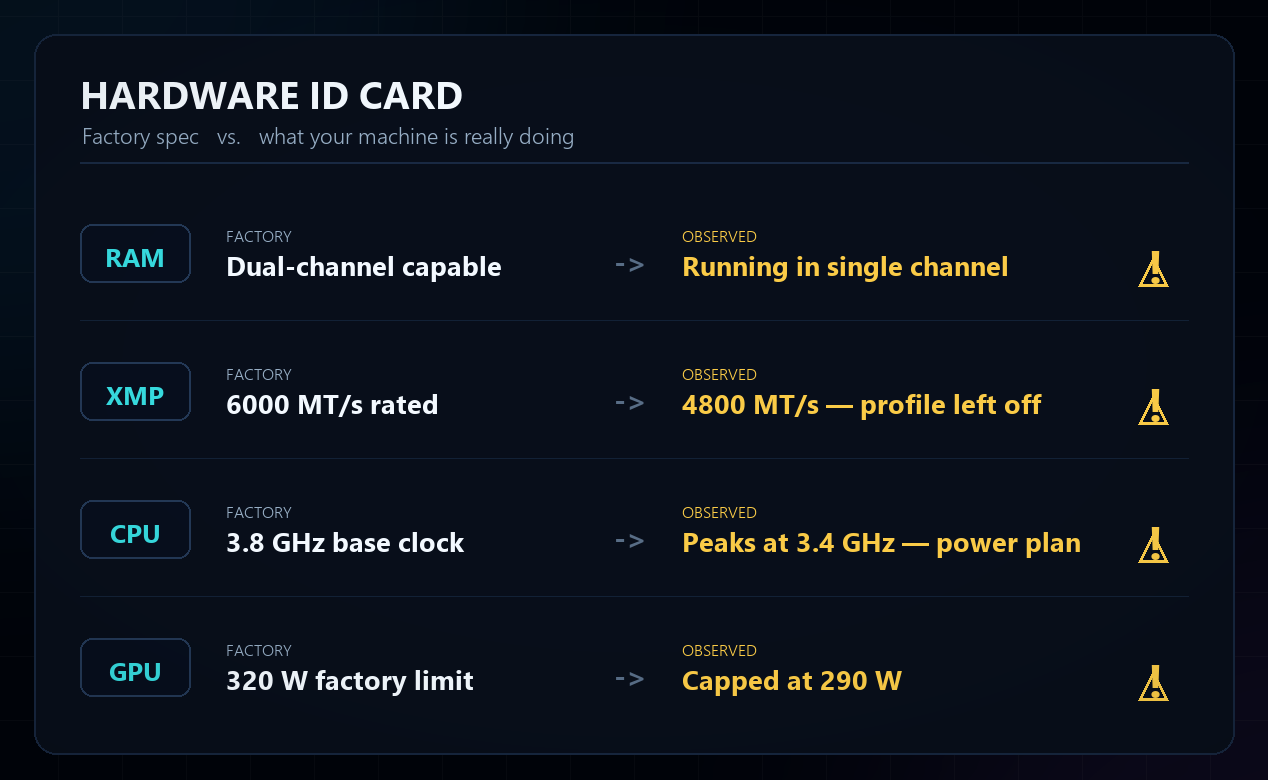
The guardian with memory

Most overlays forget.
This one keeps a diary.

Interactive Hud doesn't just show your hardware live — it remembers every session, keeps a quiet local diary of your PC even when you never open a game, and reads your factory specs to catch a rig set up wrong from day one. This is what turns an overlay into a companion — and it's the part you'll keep it around for.

It remembers.It watches, always.It knows your hardware.

Every game, graded

Close the game. Get a report.

Interactive Hud quietly records every gaming session — no setup, no button to press — then hands you a report the moment you close the game. A letter grade from S to D, your average and 1% low FPS, peak temperatures, and the power your rig pulled — in watts, Wh and real €. One click turns it into a share card, ready for Discord.
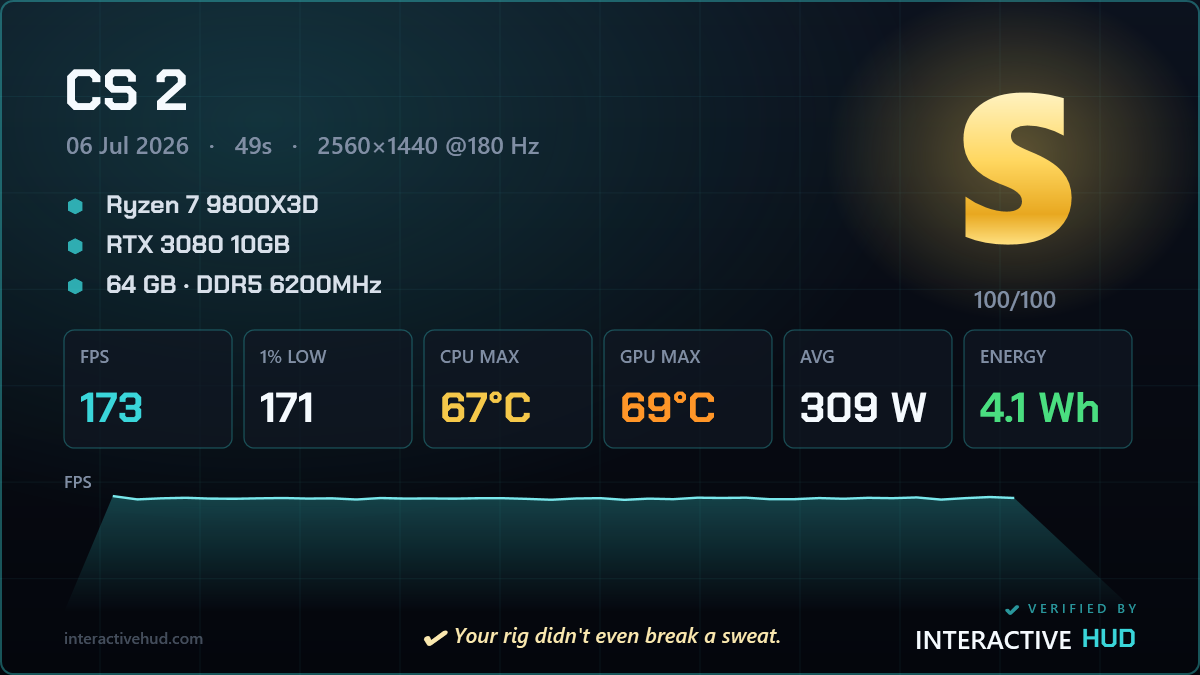
Session report card with an S grade, FPS, temperatures and energy cost

↑ Every game graded S–D — FPS, temps, energy cost and a one-click share card. All stored on your PC, never uploaded.
It works even when you're not gaming

Your PC being on is a session too.

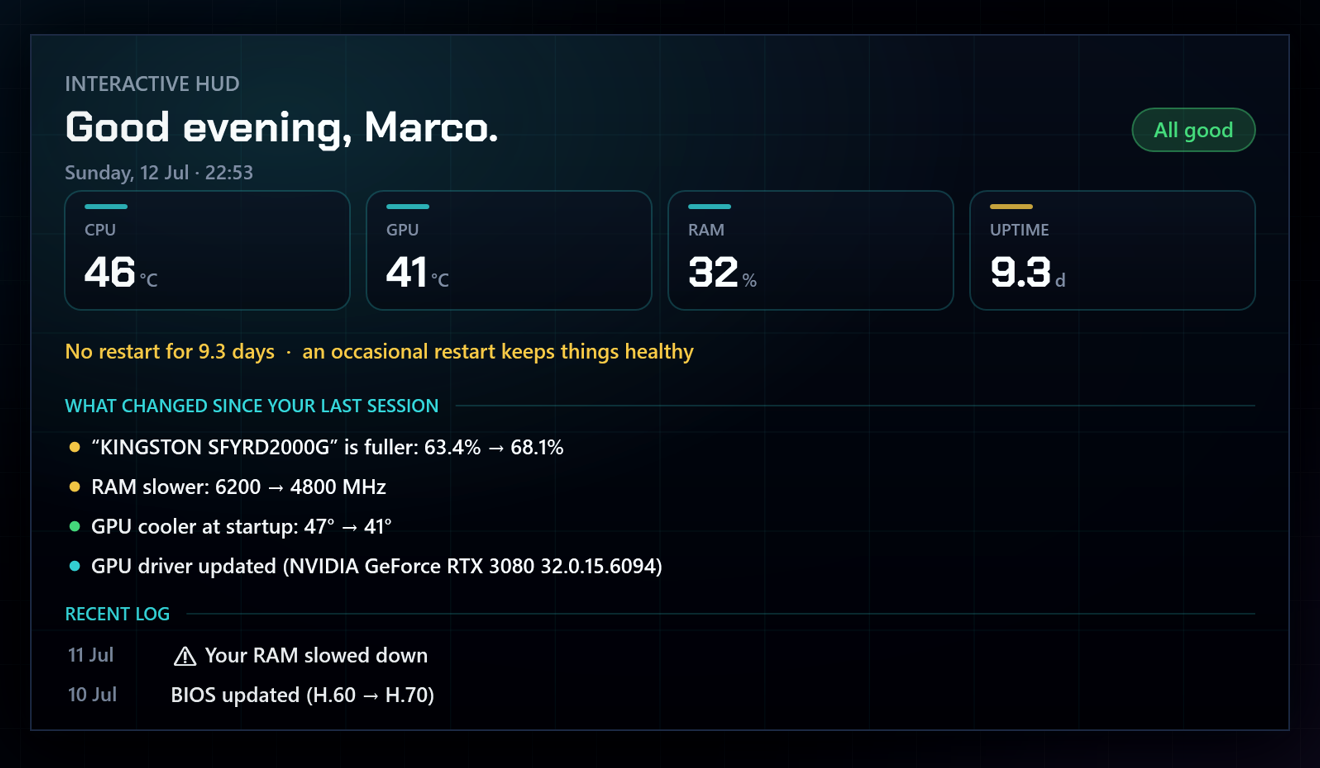
Interactive Hud treats every stretch from power-on to shutdown as an invisible session and keeps a quiet, local diary of what happened — even with the overlay hidden and no game in sight. The next time you sit down, it tells you the story of your machine.

The Panel showing the invisible-session diary: what changed since your last session and a recent log
🧩

What changed on your system

Software installed or removed, Windows updates, new drivers — noticed and logged.

📅

Your day, at a glance

A one-line summary of the session, right there in the Panel.

⏮️

Your previous session

How long it ran, how much energy it used, how many warnings fired.

Rough shutdowns, caught

If the PC went down unexpectedly — a real crash or a power loss — it tells you next time you're back. And only then.

💾

Disk filling up

A conservative heads-up when a drive is on track to run out of space.

🔒

100% local

Everything stays on your PC. Nothing uploaded, no account, ever.

Once a month, a full check-up

The report a technician would hand you.

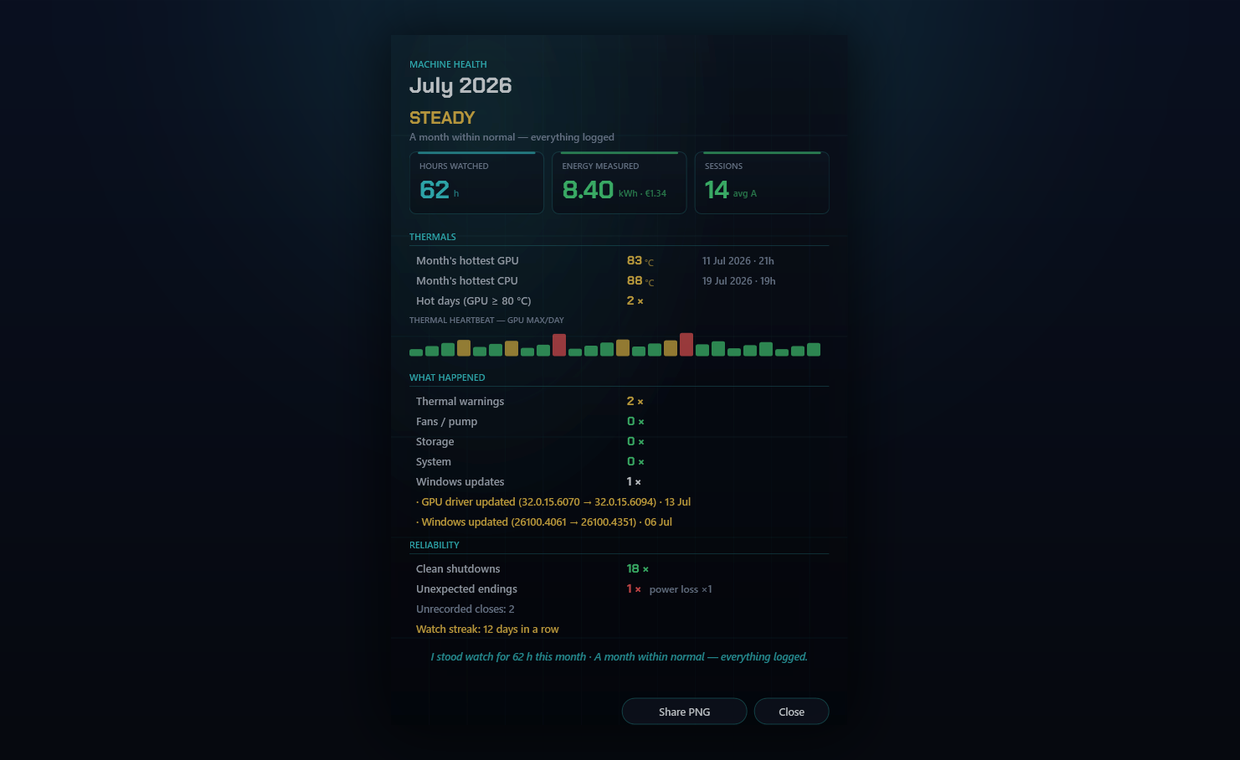
All that memory adds up to something no live overlay can give you: a monthly health report. Hours watched, a dated thermal history, every warning it raised, an honest read on reliability — in plain language, with a share-ready card. Already done, entirely local, and yours to keep.

The monthly machine health report — hours watched, thermal records, warnings and reliability

This is where memory earns its keep

It catches what builds up slowly.

Because it remembers weeks and months, Interactive Hud connects readings over time to surface problems most tools can't even see — and it only speaks once it's sure.

🔥

A slow warm-up, caught

Compares this week's temps with last month's and flags heat creeping up long before it throttles you — dust building up, or thermal paste aging.

🎯

An FPS drop, pinned to a driver

When a driver quietly costs you frames, it ties the regression to the exact update and shows the sessions before and after, side by side.

💾

An SSD wearing down

Tracks your drive's health and projects its remaining life, with a calm heads-up long before it becomes your problem.

A power supply sagging

Logs the stability of your PSU's voltage rails on every session ticket, so an aging unit shows itself before it can take the system down.

It knows your hardware

It reads your rig's factory specs.

Interactive Hud reads the factory specs straight from your own components and compares them with what your machine is actually doing — so it catches a rig set up wrong from day one, not just changes over time. It speaks in plain language, and only when it's sure.

RAM

Running in single channel — one stick where a second would nearly unlock that performance for free.

XMP

An XMP/EXPO profile left off — memory running slower than the kit is rated for.

CPU

Never reaches its base clock — often a power plan or a BIOS setting holding it back.

GPU

A power limit set below factory, or the card throttling on temperature or hardware limits.

Hardware ID card comparing factory specs vs. observed for RAM, XMP, CPU and GPU

↑ See it all in your machine's ID card — factory vs. observed, side by side, each with the likely cause and the safest fix.

Your data, nobody else's

All of this stays on your PC.

No cloud. No account. No telemetry. Your sessions, your diary and your hardware profile live in a folder on your own machine — and nowhere else. A guardian you can actually trust.

🔒 100% local🚫 No account🛡️ No telemetry